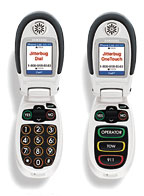
We once wrote about tech gadgets made for seniors. Big-button phones. Simple email devices. Most of those products are gone now. The idea behind them isn’t.
Many older adults use the web every day. They shop, bank, book appointments and look up local businesses. Some breeze through it. Others get stuck on small text, tiny buttons or confusing menus. That’s still true, and it’s still worth fixing.
Here’s the good news. You don’t need special gadgets anymore. You need a website that’s easy for everyone to use.
Easy for older users means easy for everyone
Just like our 2007 post said, things built for seniors help everybody. Clear text helps someone reading on a phone in bright sun. Big buttons help someone with a toddler on one arm. Plain words help someone in a hurry.
When you design for people who find the web harder, you make it easier for all your visitors. That’s not charity. It’s good business.
Start with readable text
Small, light-grey text on a white background looks sleek. It’s also hard to read.
A few simple fixes:
- Use a comfortable font size for body text, and don’t go tiny.
- Keep strong contrast between text and background.
- Let people zoom in without the page breaking.
- Keep paragraphs short. Walls of text are tiring.
Make buttons and links easy to hit
Fingers aren’t as precise as a mouse. If links are crammed together, people tap the wrong one and get frustrated.
- Make buttons big enough to tap easily.
- Leave space between links.
- Make links look like links. Underlines still work.
- Label buttons with what they do: “Call us,” “Request a quote,” “See our hours.”
Keep navigation simple
A menu with too many choices slows everyone down. Hidden menus and clever icons can leave people guessing.
- Keep main menu items few and clearly named.
- Put your phone number and contact link where people expect them.
- Don’t move things around from page to page.
Go easy on pop-ups and moving parts
Auto-playing video, sliders that change every few seconds and pop-ups that cover the page are annoying for anyone. For someone who reads more slowly, they can make a page unusable. If you use them, give people an obvious way to pause or close them.
Make forms forgiving
Forms are where a lot of visitors give up.
- Ask only for what you need.
- Put labels above fields, not just as grey text inside them that disappears.
- Explain errors in plain words, right next to the field.
- Offer a phone number as a backup. Some people would just rather call.
Accessibility guidelines help here
There’s a standard for this. The Web Content Accessibility Guidelines (WCAG) are published by the W3C, the group that sets web standards. Version 2.2 is the current one. It covers things like contrast, text resizing, keyboard use and clear labels.
You don’t have to read the whole thing to get started. Many of the tips above line up with it. But if accessibility matters for your business, and it usually does, having your site checked against WCAG is a smart step.
Test it with real people
The best test is simple. Ask an older friend, parent or customer to use your site while you watch. Don’t help. Just note where they pause or get stuck.
Try a few tasks:
- Find your phone number.
- Find your hours or location.
- Fill out your contact form.
You’ll learn more in 15 minutes than from any checklist.
We can help
Making a site easier to use is a big part of what we do. If your site needs a cleanup or a fresh start, take a look at our Website Design services. Or just get in touch. Call 678-379-9321 or email sales@3by400.com.